How I made Business Central enforce Quebec's French-language law (Bill 96)
By Fred Morin ·
Business version (in French): Loi 96 : vos factures Business Central sont-elles vraiment en français ?
If you sell to customers in Quebec, your invoices have to be in French. Since Bill 96 (the 2022 reform of the Charter of the French Language) came fully into force on June 1, 2025, the rules are stricter and the language office is busier than ever.
Business Central already has what you need to produce French documents. What it doesn't have is anything that checks. Nothing stops someone from posting an English invoice to a customer in Montréal.
So I built an extension that does. This post covers what it does and how it is put together: the design, the events it hooks into, and the two traps I fell into. If you have an AL developer, it should be enough to get them started.
This is about helping with compliance, not legal advice. For your actual obligations, see the Office québécois de la langue française.
What the law asks of your ERP
The Charter covers a lot: signage, websites, the language of work. Three articles land directly in your sales documents:
| Charter article | What it covers | Where it shows up in Business Central |
|---|---|---|
| s. 57 | Order forms, invoices, receipts | The language of quotes, orders, invoices and credit memos |
| s. 51 | Product inscriptions, including documents supplied with the product | Item descriptions on the lines |
| s. 55 | Contracts of adhesion (standard terms) | Payment terms and shipment methods |
Other languages are allowed. A bilingual invoice is fine, as long as the French isn't less prominent.
Is it actually enforced?
Yes, but not the way the scary articles say. The OQLF received a record 11,125 complaints between April 2025 and March 2026, and inspections are up about 40% (CTV News). Yet the OQLF's own list of court convictions for 2025 has only six, with fines of $700 to $3,000.
The real process is: complaint, inspection, formal notice, you fix it. The real risks are the complaint itself (it takes a minute to file), customers' own recourse under Bill 96, losing access to provincial contracts, and bad press. So the goal isn't to dodge fines. It's to make French the default.
The gaps in standard Business Central
With the Canadian localization you already have the FRC (French, Canada) language code, item translations, translations for units of measure, payment terms and shipment methods, and the free French language (Canada) app for report labels. Nothing connects them:
- A Quebec customer with no language code gets English invoices.
- An item with no French translation prints in English.
- An item translated after the line was created keeps its English description on that line.
- Without the French language app, the data is French but the invoice still says "Invoice" and "Total".
What I built
Check French Compliance on any sales document lists everything that isn't in French, with a suggested fix for each issue.
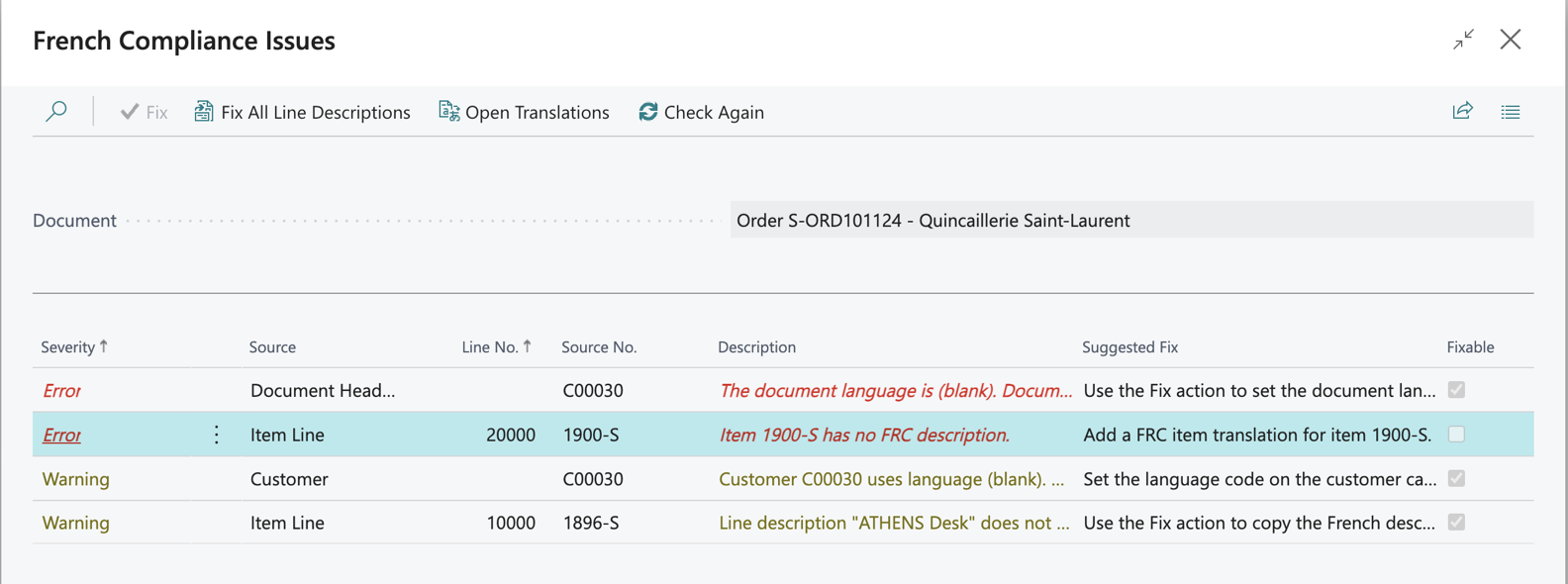
Two errors and two warnings on an order for a Montréal customer.
Fix repairs what it can in one click: it sets the document language and copies the French descriptions onto the lines.
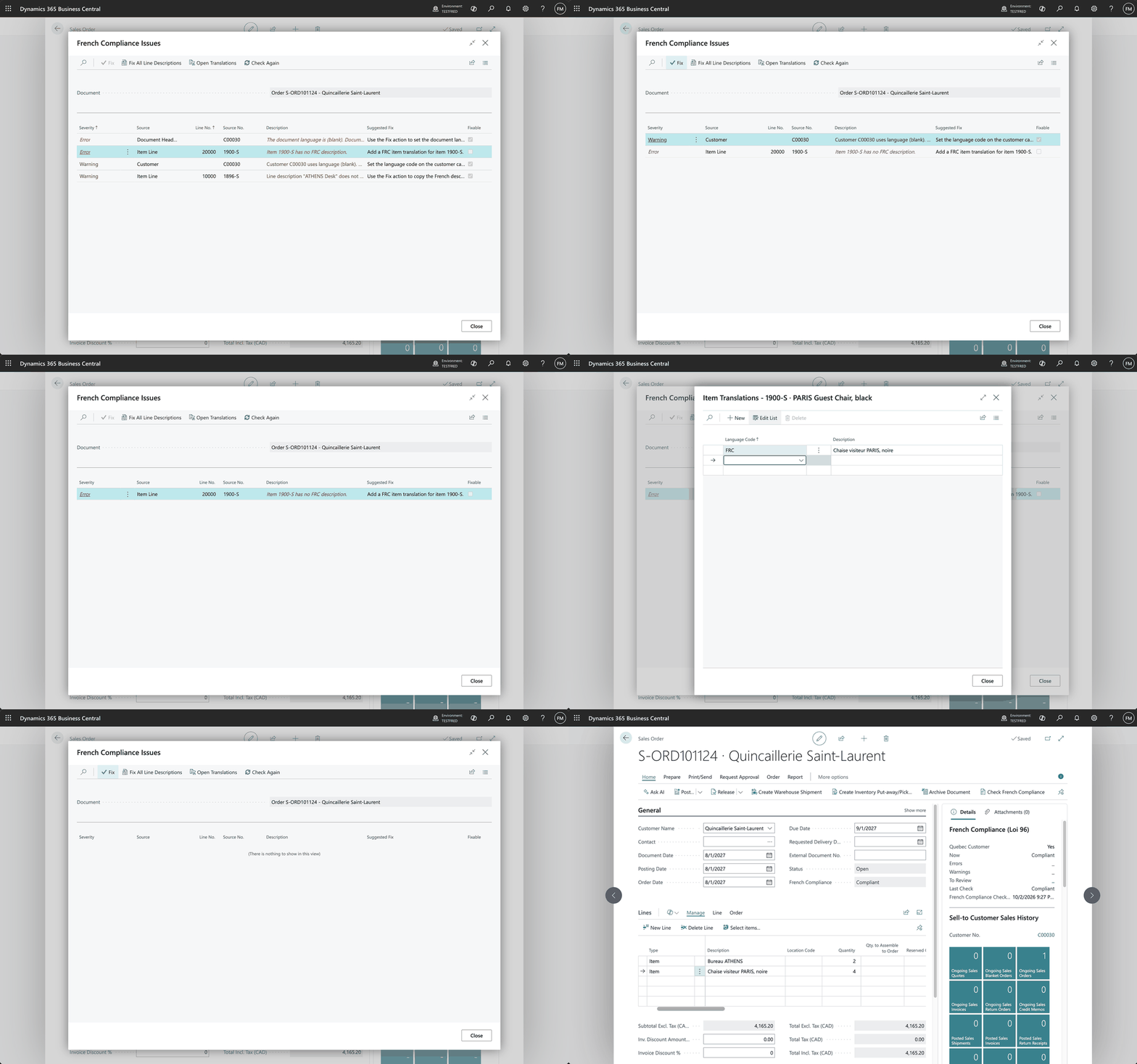
From four issues to Compliant: fix the language, add the missing translation, done.
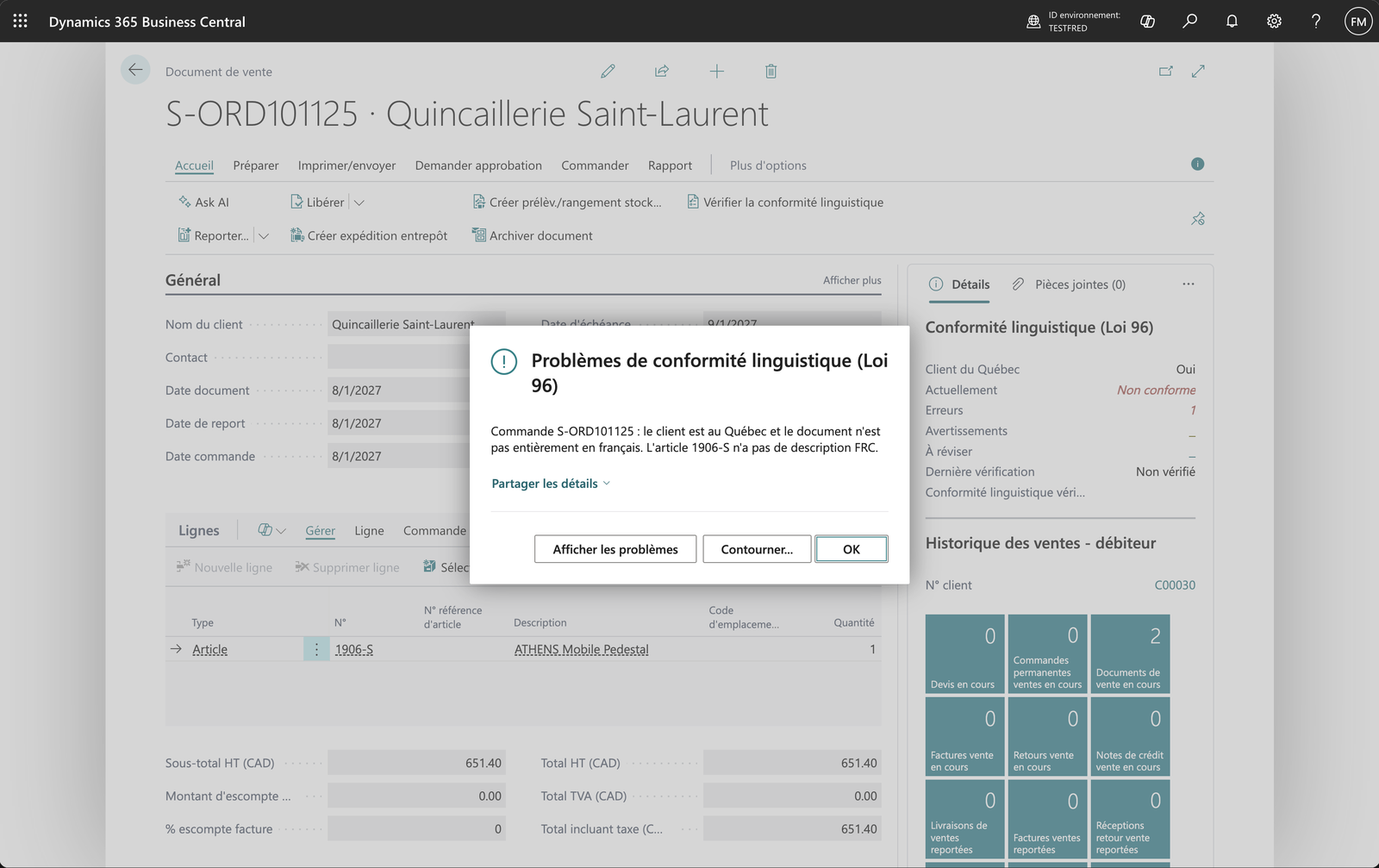
On release and posting, a document with issues is stopped. The user can look at the issues, or override with a reason. Every override is logged, and the result (Compliant or Overridden) is kept on the posted invoice.
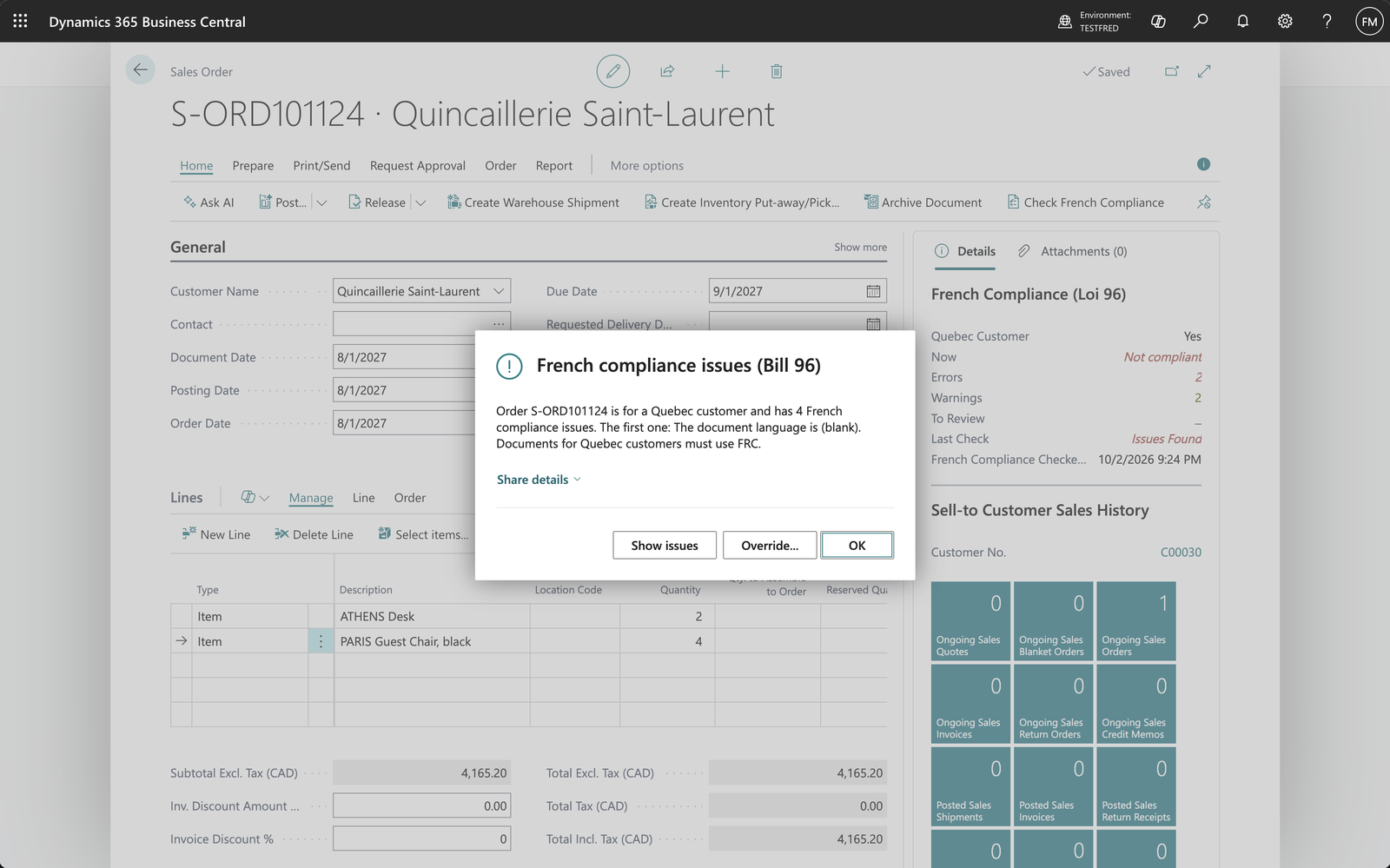
Release is stopped, with the issues one click away.
A Compliance Gaps worksheet scans the whole company before anything reaches an invoice: Quebec customers not set to French, items without a French description, untranslated terms, and the missing language app.
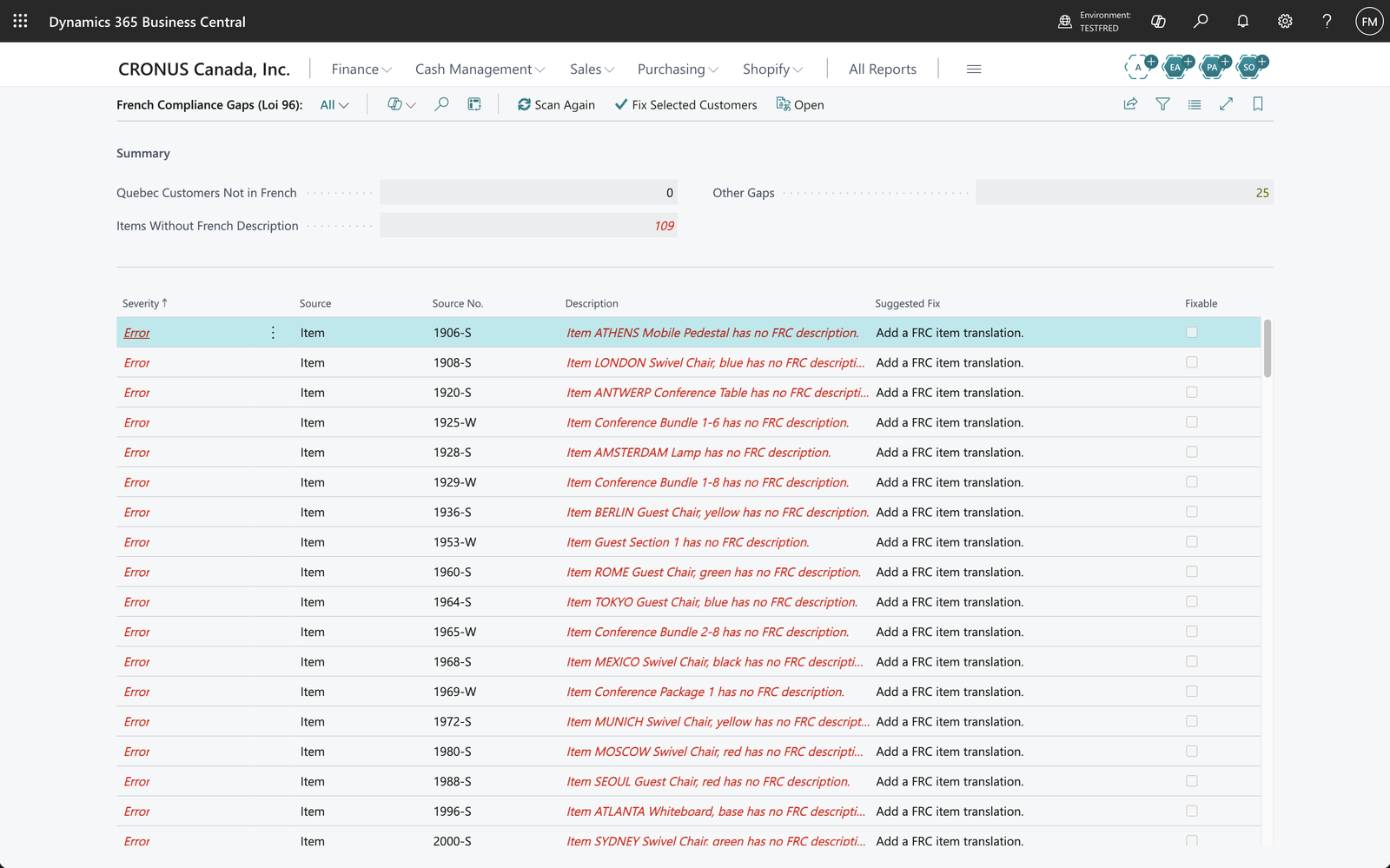
On the demo company: 109 items without a French description.
And the extension itself is in Quebec French, using Business Central's own fr-CA wording.
How I built it
About 45 AL objects: tables, pages, codeunits and extensions of the standard sales pages. Here's the recipe.
1. Decide what "a Quebec document" means
A document is in scope when the bill-to or ship-to address is in Canada and its County field says Quebec. Real data is messy, so I keep a small table of aliases (QC, PQ, QUEBEC, QUÉBEC) and compare trimmed, uppercase values. Make it configurable; every company's data is different.
2. Write the check as a function that writes nothing
One codeunit takes a Sales Header and fills a temporary table of issues, each with a source, a severity and a suggested fix:
- Document language isn't FRC: error
- Customer language isn't FRC: warning, since future documents will be English too
- Item with no FRC
Item Translation(try the variant first, then the item): error - Line description doesn't match the translation: warning. This is the sneaky one. BC copies the description when the line is created and never looks again.
- Unit of measure, payment terms or shipment method with no FRC translation: warning
- G/L, resource and comment lines: info only, since there's nothing to compare them to
Because it writes nothing, the same function feeds the manual check, the FactBox, release, posting and the tests.
3. Hook release and posting
Two event subscribers are enough:
Release Sales Document:OnBeforeReleaseSalesDocSales-Post:OnBeforePostSalesDoc
Skip PreviewMode, skip temporary records, and remember that posting an open order releases it too, so the check runs twice. That's fine as long as it's cheap and gives the same answer both times.
4. Don't open a dialog inside posting (trap 1)
My first version asked "continue anyway?" with a page. Business Central refused: RunModal isn't allowed inside a write transaction, and release and posting are write transactions.
The fix is an ErrorInfo with actions. The error rolls everything back, and the actions run afterwards, in a clean context where opening pages is fine:
BlockedError.Message := StrSubstNo(BlockedSingleMsg, SalesHeader."Document Type", SalesHeader."No.", FirstIssue);
BlockedError.RecordId := SalesHeader.RecordId();
BlockedError.AddAction(ShowIssuesActionTxt, Codeunit::"BQC Enforcement", 'ShowIssues', ShowIssuesActionDescTxt);
if CanOverride() then
    BlockedError.AddAction(OverrideActionTxt, Codeunit::"BQC Enforcement", 'OverrideIssues', OverrideActionDescTxt);
Error(BlockedError);
5. Don't modify the record on the user's screen (trap 2)
My first override wrote "Overridden" on the sales header. The database was right, but the order page still held its old copy, so the next release didn't see the override. Left alone, BC eventually says "the information on the page is not up to date".
The fix: never write to the header behind the page's back. Overrides go into their own log table with a SHA-256 fingerprint of the exact issues, and release and posting look them up there. If someone edits the order after the override and a new issue appears, the fingerprint no longer matches and the document is stopped again.
6. Keep the evidence for free
Give the status fields the same field numbers on Sales Header, Sales Invoice Header and Sales Cr.Memo Header. Posting uses TransferFields, so the status travels to the posted invoice with no extra code.
7. Test it, even on a Mac
I built this on a MacBook. BC containers don't run on a Mac, and my trial environment was Production, which refuses F5 and even Download Symbols. What worked:
- "AL: Download symbols from global sources" in recent AL versions pulls Microsoft's symbols from their public feed. Set
"al.symbolsCountryRegion": "ca"and you have the Canadian Base Application without any environment. - The AL compiler runs on macOS, analyzers included.
- A sandbox environment for publishing with F5, clicking around and taking screenshots.
- A small test app (20 tests) for the logic: Quebec detection, each check, release and posting, overrides.
Both traps above are the kind a test with a simulated "OK" click catches in seconds. Write those tests.
Where it can go next
The slow part of getting compliant is translating the catalogue, and that's what a model is good at. Next, I'm looking at having an AI assistant inside Business Central suggest French descriptions for everything the Gaps worksheet finds.
If you run Business Central in Quebec and want this working in your company, adapted to your documents and your data, let's talk.