Checking Quebec subcontractors in Business Central: RBQ licence, Revenu Québec, CNESST, CCQ
By Fred Morin ·
Business version (in French): Licence RBQ, attestation de Revenu Québec, CNESST : Business Central peut vérifier vos sous-traitants
In Quebec, the company that hires a subcontractor carries part of the risk when that subcontractor isn't in good standing. Four documents matter, and in most companies they live in email threads and spreadsheets, disconnected from the ERP that actually sends the purchase orders and the payments.
So I built a Business Central extension that checks them where the money moves: on purchase release and posting, and on payment posting. This post covers what it does and how it is put together, with enough detail for an AL developer to get started.
This is about helping with compliance, not legal advice. The rules below are summarized from the RBQ, Revenu Québec, the CNESST and the CCQ, and the Autorité des marchés publics for the RENA.
Updated October 7, 2026: the extension now also checks the RENA on public contracts. See the last row of the table, and steps 8 and 9.
The four documents, and one register
| Document | Rule | When the ERP should care |
|---|---|---|
| RBQ licence | The contractor needs an active licence in the right subcategory. Using an unlicensed contractor exposes a company to fines of $32,267 to $161,334 | Purchase release and posting |
| Revenu Québec attestation (ARQ) | Required once construction contracts with the same subcontractor reach $25,000 before taxes in a calendar year. Copy by the 7th day of work, authenticity verified by the 10th. Valid until the end of the month of issue plus 3 months | Purchases, once the threshold is reached |
| CNESST letter of compliance | Without it at the end of the contract, the CNESST can claim the contractor's unpaid premiums from you | Payments |
| CCQ status letter | The general contractor is jointly liable for wages owed to a subcontractor's workers | Payments |
| RENA (public contracts only) | A business on the register of enterprises ineligible for public contracts, kept by the Autorité des marchés publics, cannot be a subcontractor on a public contract, and the contractor must check before subcontracting (Act respecting contracting by public bodies, s. 21.5.5 and 21.11). Fines of $7,500 to $40,000 for a company, for both parties (s. 27.8) | Purchases and payments flagged as a public contract |
What it does
A Contractors at Risk page lists every flagged subcontractor that needs attention, most urgent first.
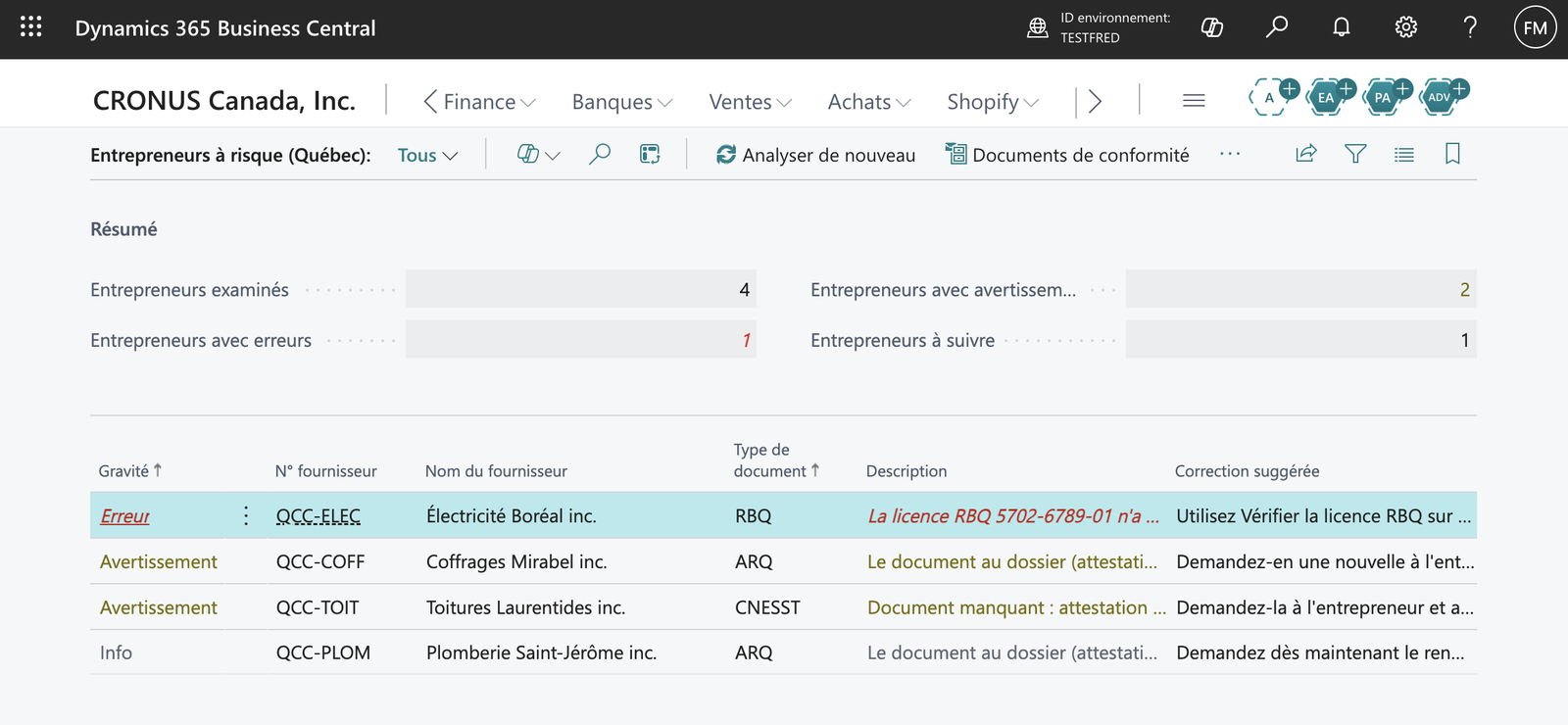
One subcontractor per situation. The demo runs in Quebec French; every string is translated.
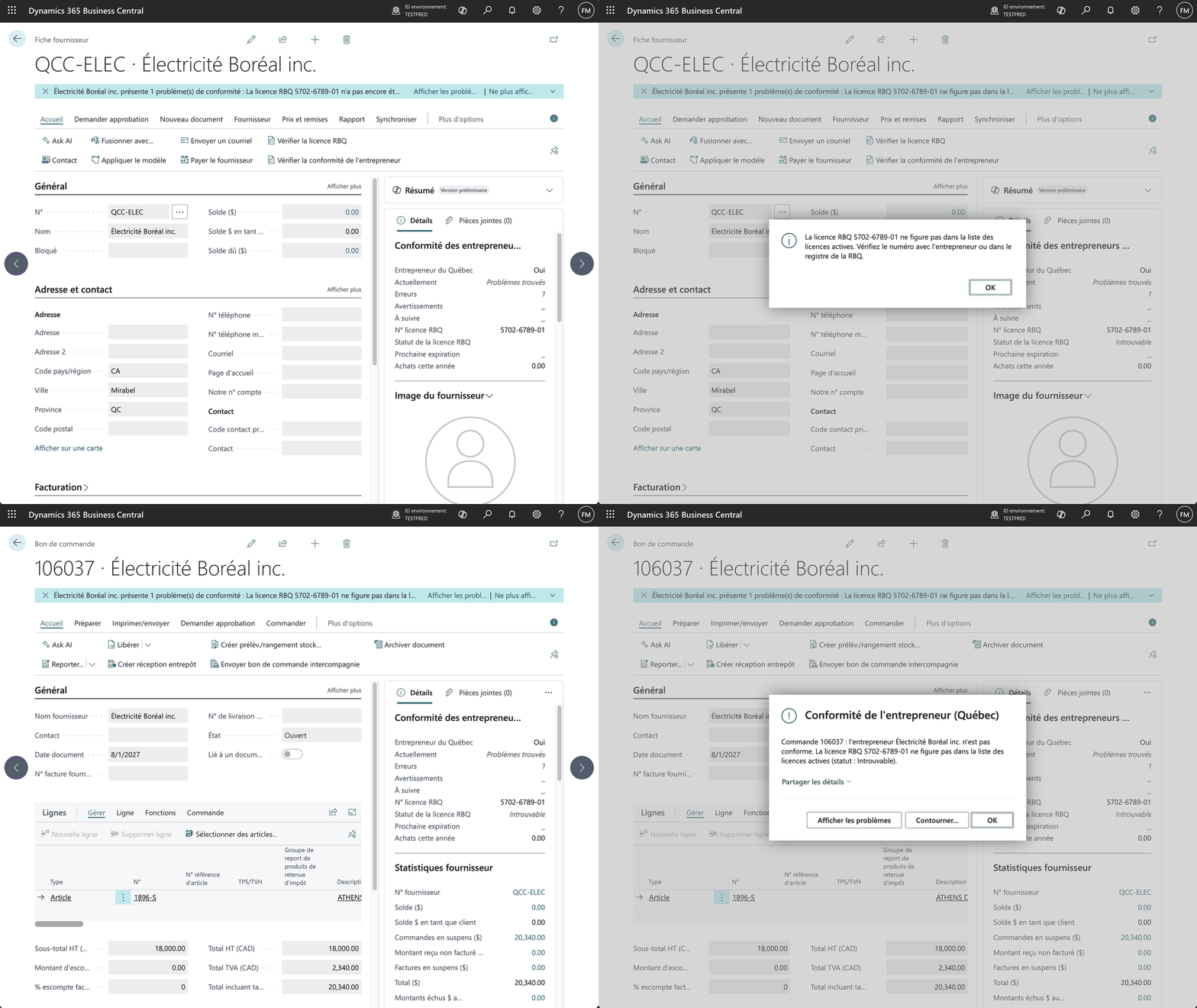
The RBQ licence is checked against the RBQ's own data, live, and again every night. When it isn't in the list of active licences, the purchase order doesn't go out.
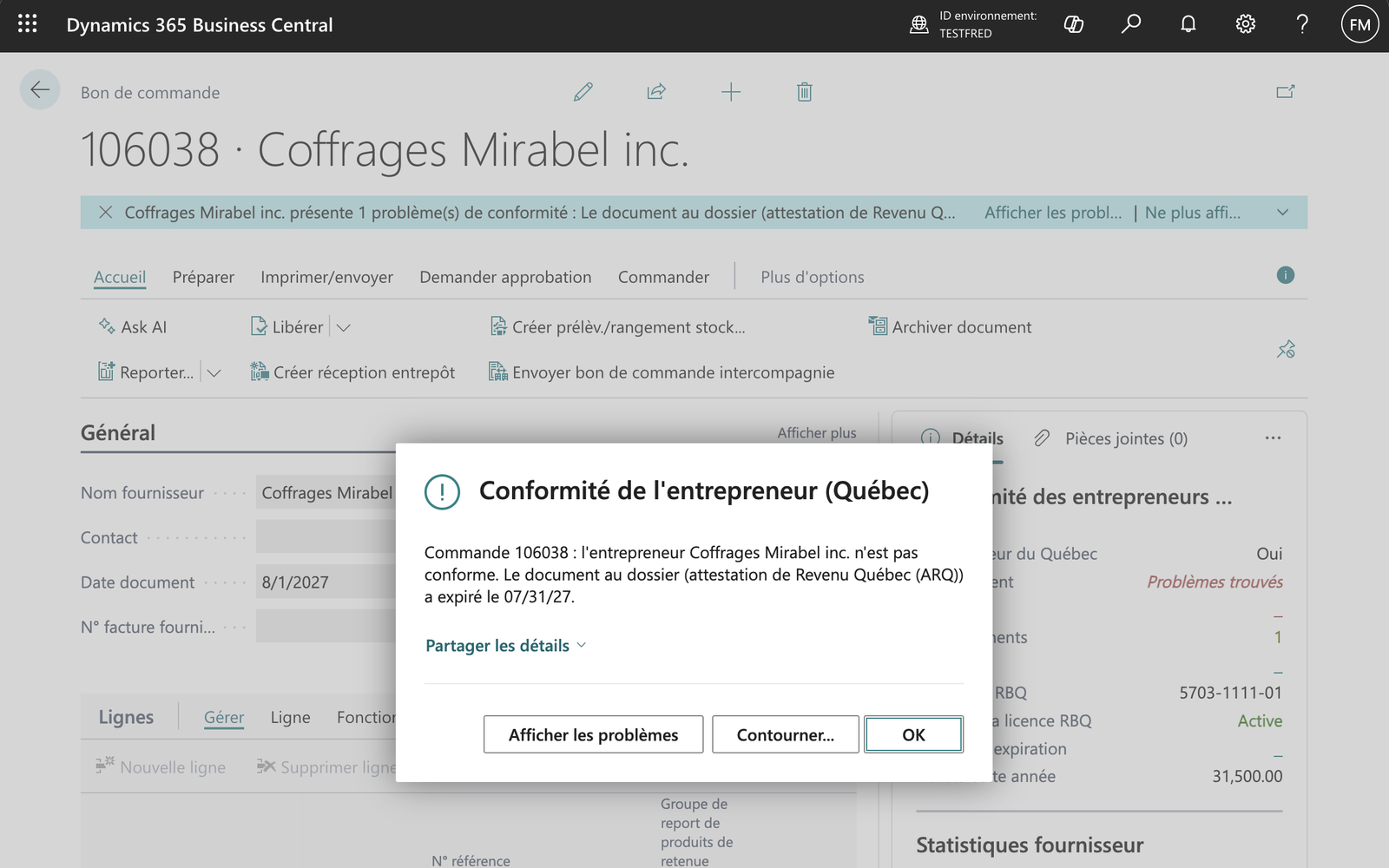
The extension sums the year's purchases per subcontractor, including the document being released, and requires the Revenu Québec attestation once the threshold is crossed.
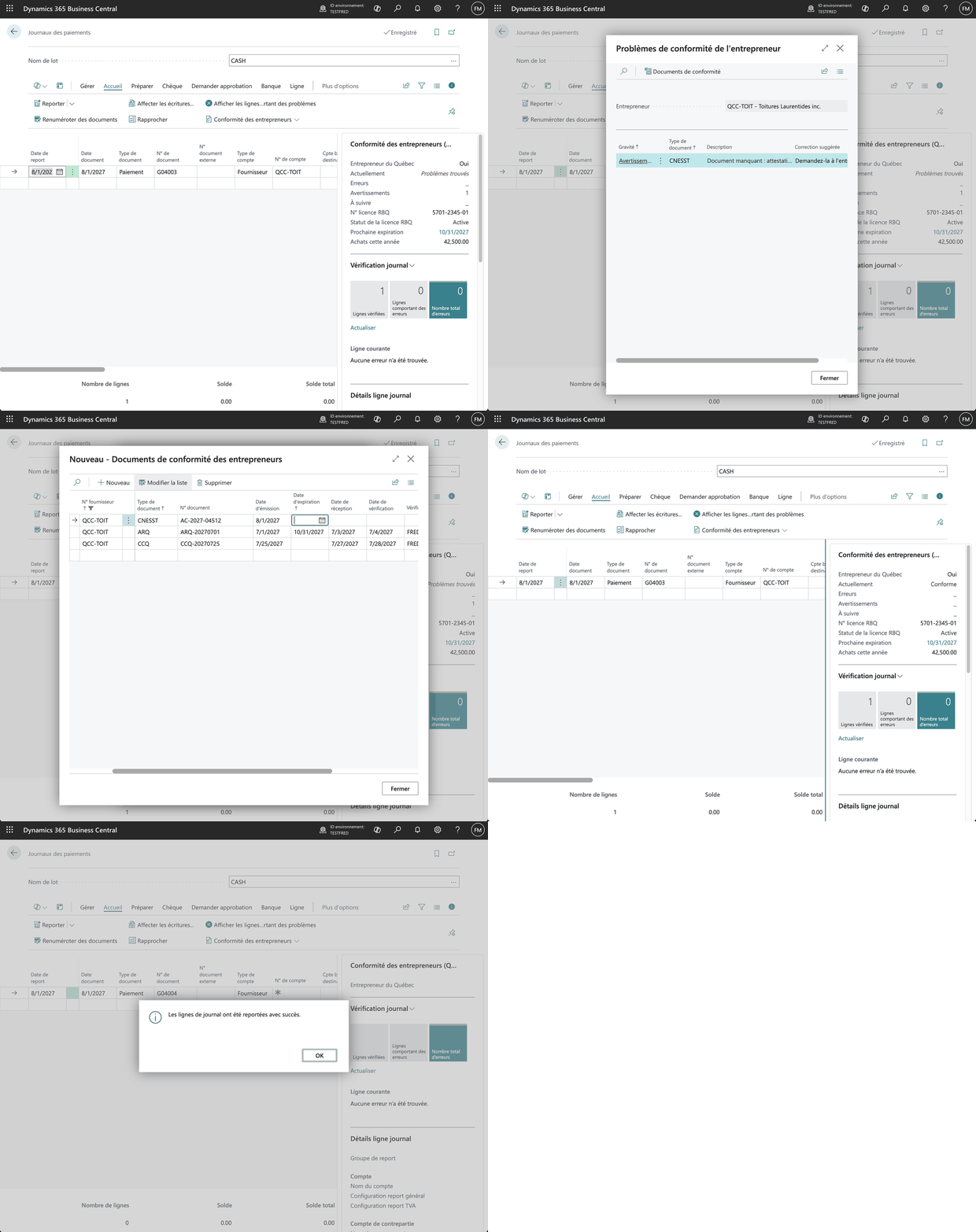
On the payment journal, the CNESST and CCQ letters are checked before posting. Add the missing document, and the payment goes through.
On a public contract, the subcontractor is also checked against the RENA. The extension downloads the register every week and matches vendors by NEQ, the Quebec enterprise number. A purchase order flagged as a public contract is stopped when the subcontractor is listed; without the flag, the listing is shown for information, since a listed business can still do private work.
How I built it
About 60 AL objects. Here's the recipe.
1. Model the rules as data
A Document Type table holds each document: its kind (RBQ, ARQ, CNESST, CCQ or your own, like an insurance certificate), when it's required (on purchases, once the ARQ threshold is reached, or before payment), the enforcement (None, Warn, Block) and a default validity as a DateFormula (<CM+3M> for the ARQ: end of the month of issue plus three months).
A Vendor Document table holds what each subcontractor gave you: number, issue date, expiry date, received date, and who verified it and when. Two setup profiles (a construction company, or a business hiring contractors for its own buildings) filter which types apply.
2. Read the RBQ open data
The RBQ publishes its active licences daily on Données Québec, behind a public CKAN datastore_search API. No key needed:
Url := StrSubstNo('%1?resource_id=%2&filters=%3', ApiUrl, ResourceId,
    Uri.EscapeDataString(StrSubstNo('{"Numero de licence":"%1"}', LicenceNo)));
HttpClient.Get(Url, Response);
The response has one record per subcategory. An unknown or suspended licence returns zero records, which is your "not found". I cache status, restriction, holder name, NEQ and subcategories on the vendor, with a timestamp. A job queue entry refreshes them nightly, and each lookup runs in its own Codeunit.Run so one failure doesn't stop the batch. In a sandbox, remember to turn on Allow HttpClient Requests for the extension.
A light sanity check compares the RBQ holder name with the vendor name. A licence number typed with one wrong digit can point to a real, active, completely different company.
3. Sum the threshold from ledger entries
The ARQ threshold is a sum of Purchase (LCY) on the vendor ledger entries for the calendar year, plus the amount of the document being released. Once any year since the rule started crossed it, the attestation is required for every later contract, so the check looks back, not just at this year.
4. One check function, many callers
Like the Bill 96 extension, a single codeunit takes a vendor, a context (purchase, payment, review), a date and an amount, and fills a temporary table of issues. It writes nothing. The same function feeds the release check, the payment check, the FactBox, the notification and the at-risk worksheet.
5. Hook purchases and payments
Release Purchase Document:OnBeforeReleasePurchaseDocPurch.-Post:OnBeforePostPurchaseDocGen. Jnl.-Post Batch:OnBeforeProcessLines, filtered on payment lines to a vendor
Errors are an ErrorInfo with Show issues and Override... actions, and overrides go into a log keyed by a SHA-256 fingerprint of the vendor, the document and the exact issues. If the issues change, the override no longer applies.
6. The trap: journals swallow your error actions
Release and posting show the ErrorInfo with its buttons. Journal posting doesn't. Gen. Jnl.-Post Batch collects errors into the Error Messages page, and the actions are gone: the user sees why the payment was stopped, with no way to fix or override it.
The fix is to give the payment journal its own Check and Override... actions that call the same code, so the user can resolve the issue before posting. Test your error paths in a journal, not just on documents.
7. Translations aren't only labels
The document type descriptions are data, saved in the language of whoever set up the company. My first French run-through showed "Aucune CCQ status letter au dossier". Messages about the official documents now use labels by document kind, and only custom types fall back to the stored description.
8. A register that is a file, not an API
The RENA is a monthly JSON file on Données Québec, about 1,800 entries, with no datastore to query. Three things are worth copying.
Resolve the file's address at run time. The dataset page lists its files, and their addresses can change from one publication to the next. Ask CKAN's package_show for the dataset and take the resource whose format is JSON:
foreach ResourceToken in Resources do
    if UpperCase(GetText(ResourceToken.AsObject(), 'format')) = 'JSON' then
        exit(GetText(ResourceToken.AsObject(), 'url'));
Validate before you replace. Parse the file into a temporary table first. An unreadable file, an empty one, or one with less than half of the rows already on file is refused: the previous copy stays, and the reason is shown on the setup page. A compliance check that quietly empties its own reference data is worse than no check.
Store less. The file names individuals: related persons, majority shareholders, the municipality where they live. Matching only needs the NEQ, so those fields are never read. That is a Law 25 question answered by not having the data.
One surprise in the data: provisional entries have no flag. The only sign is the words "Inscription provisoire" in the decision text, and no end date, which is exactly what section 21.7 of the Act prescribes.
9. What the tests caught
The RENA check came with a test app, and its first run earned its keep:
- 45 days don't fit in an Integer. "Out of date after 45 days" was written as a difference of DateTimes compared with
45 * 24 * 60 * 60 * 1000milliseconds. That is 3.9 billion, above the 2,147,483,647 an Integer holds. The compiler refused the constant in the test; in the app, where the 45 came from a setup field, it would only have failed at run time. Compare dates instead. asserterrorrolls back your test data. A test that expects an error and then continues mustCommit()its setup first.- A 10-character NEQ field is exactly too short. An NEQ is 10 digits, but people type "1172 411 358". Ignoring spaces and dashes only helps if the field can hold them.
Where it can go next
Per-project tracking of work start and end dates (the CNESST letter is per contract), reminders emailed to subcontractors before their documents expire, and reading the dates from an uploaded PDF instead of typing them.
If you run Business Central with Quebec subcontractors and want this working in your company, adapted to your rules and your documents, let's talk.